
PMED - Preço de Procedimento
OAZEZ Software & TecnologiaMedical
0.00.00 Reviews
- Version
- 17.7
- Installs
- 10.00K
- Age Rating
- Everyone
Screenshots
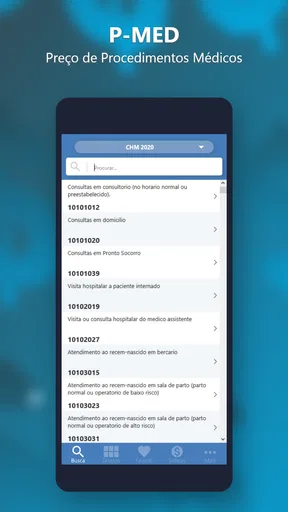
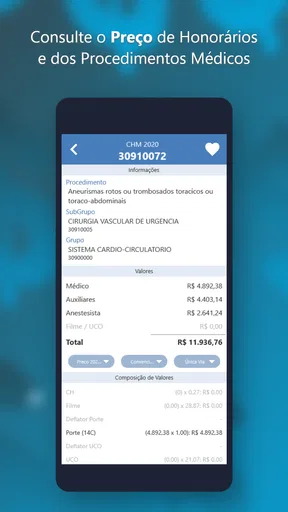
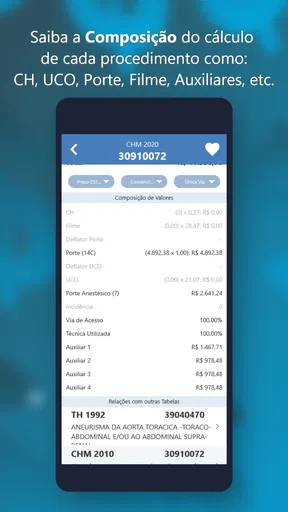
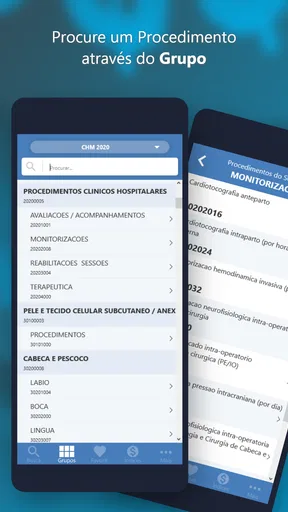
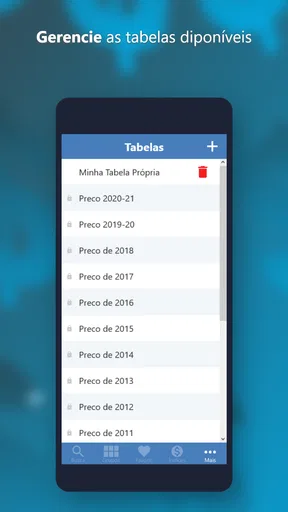
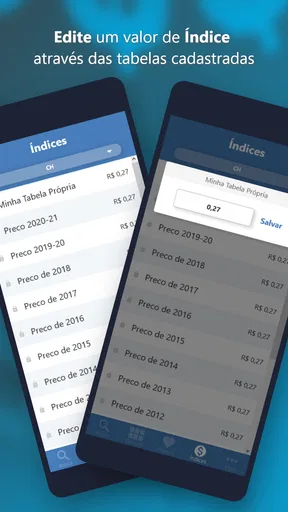
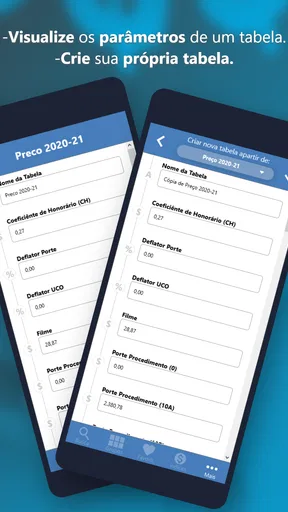
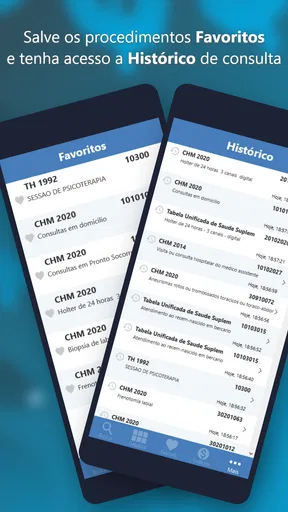
Our Review of PMED - Preço de Procedimento
 Analysis by Appyee
When I first looked at PMED - Preço de Procedimento, I understood its appeal quickly: it is a medical app built around the practical problem of calculating procedure prices and comparing TUSS with other reference tables. That is a much narrower purpose than a general health app, and in my experience that focus is exactly what makes it useful for the right person. It is not something I would install for symptom checking, appointment booking, or patient education. I would consider it when the daily task involves translating medical procedures into prices and checking how different tables relate to one another.
The app is developed by OAZEZ Software & Tecnologia and is listed in the Medical category. Its store short description is simply “PMED,” while the longer summary points to procedure-price calculation and TUSS comparisons. Those details matter because they set a realistic expectation: this is a work-oriented reference and calculation tool, not a complete medical office system. If your main question is whether it can help with pricing decisions, it deserves a closer look. If you want a broad clinical companion, I would start elsewhere.
What I would check before choosing PMED
My first decision criterion would be how often I deal with procedure pricing. A person who only needs an occasional estimate may find a dedicated app excessive, especially when a clinic already has an established billing workflow. On the other hand, someone who repeatedly works with TUSS and alternative tables can benefit from having the calculation task in one focused place instead of rebuilding it in a spreadsheet each time.
The second criterion is the kind of accuracy the job requires. An app that calculates a value is only useful when I begin with the correct procedure reference, table, and context. I would not treat the displayed amount as a medical truth or as an automatic replacement for the rules used by a particular insurer, clinic, or professional agreement. The important habit is to verify the selected procedure and table before using the result in a quotation or billing discussion.
That point is easy to overlook. A fast calculation can create false confidence if the wrong item is selected. My practical approach would be to keep the original request, authorization, or billing reference beside me while using the app. I would compare the procedure wording rather than relying only on a familiar abbreviation. This is one of the most valuable ways to use PMED: as a structured aid for checking and calculating, not as permission to skip professional review.
The third criterion is whether I need a mobile workflow. PMED is an Android app with a minimum operating-system requirement of Android 6.0, so it is aimed at a wide range of compatible devices rather than only the newest phones. That can be convenient for a small practice or a professional who needs to consult a calculation away from a desk. Still, a phone screen may feel restrictive when I need to compare many entries or document a long series of procedures.
I would also look at the payment model before committing. PMED costs $4.99, and it also lists in-app purchases ranging from $0.99 to $1.99 per item. For a tool used regularly, that may be reasonable, but I would want to understand which parts of my workflow require additional purchases before making it central to billing. The key question is not simply whether the initial price is low; it is whether the complete way I intend to use the app remains predictable.
How I would use it during a normal workday
Imagine a small clinic preparing a procedure estimate after a patient asks what a planned service may cost. I would first identify the exact procedure in the relevant reference material, then use PMED to calculate the amount and compare the TUSS entry with another applicable table. Before communicating the figure, I would record which table was used and make clear that the result is an estimate tied to that reference.
This workflow is more reliable than opening the app and searching casually from memory. It also makes the result easier to explain later if a colleague asks why two amounts differ. The comparison itself can reveal that a difference comes from the table rather than from a calculation mistake. That is a non-obvious strength: the app can support the conversation around a price, not merely produce a number.
Another useful habit is to separate three steps that people often mix together: identifying the procedure, selecting the pricing reference, and calculating the value. I would not perform all three mentally at once. PMED is most helpful when I use it as the calculation and comparison stage after the procedure has already been identified carefully.
Where PMED is strongest
The clearest advantage is focus. Many medical apps are designed for patient records, reminders, drug information, fitness, or communication. PMED concentrates on procedure pricing and table comparison instead. That specialization can reduce distraction when the task is administrative rather than clinical.
I also like the idea of comparing TUSS with other tables in the same workflow. In a spreadsheet, I would need to maintain the structure myself, remember which reference each column represents, and build formulas that remain understandable months later. A focused tool can make that process less improvised. Even when I still verify the final amount elsewhere, having a dedicated place to organize the comparison is useful.
The app may be especially suitable for professionals who do not need a full enterprise billing platform. A solo practitioner, a small office, or an administrative worker handling procedure estimates may prefer a compact calculation tool over software filled with scheduling, patient management, and reporting features they will never use. In that setting, PMED’s narrow purpose is an advantage rather than a limitation.
Its long availability also suggests a product with a history rather than a brand-new experiment: it was released on August 22, 2012, and the current version is 17.7. I would not interpret age alone as proof of quality, but it does make the app feel like a tool built around an established use case. The practical question remains whether its current workflow matches the way I work today.
For accessibility, the content rating is Everyone. That does not make it a general-purpose app for every user; it simply means the rating does not restrict it to an adult audience. The relevant audience is still people who understand medical procedure terminology and the consequences of using pricing references incorrectly.
Three practical habits that improve the results
First, I would create a short verification routine before accepting any result. I would check the procedure name, the table selected, and the unit or quantity being calculated. This is more useful than assuming that a familiar code automatically represents the service I need. A calculator can be precise while still answering the wrong question.
Second, I would use comparisons to investigate discrepancies rather than immediately choosing the higher or lower amount. If TUSS and another table produce different figures, I would treat that difference as a prompt to check the agreement or billing context. The app can expose variation, but the professional decision about which reference applies still belongs to the person responsible for the estimate.
Third, I would keep PMED as a companion to documentation, not as the only record. After calculating a price, I would note the reference used and the date of the internal estimate in the clinic’s normal records. This creates an audit trail without pretending that a mobile calculation alone explains every billing decision. That workflow is particularly important when several people may review the same quote.
A fourth habit is to test the app with a familiar procedure before using it for an urgent or unfamiliar request. That gives me a chance to learn the search and calculation flow without pressure. It also helps reveal whether the terminology feels natural for my specialty. A tool can be technically appropriate yet slow me down if its vocabulary does not match the way my team identifies procedures.
Where a different kind of tool may fit better
PMED is not the right choice for every medical office. If I need patient records, appointment scheduling, invoices, inventory, or team permissions, I would look at a practice-management platform instead. Those systems may be more cumbersome for a quick calculation, but they can provide a broader operational record that PMED is not designed to replace.
A spreadsheet may be a better option when my work involves custom formulas, large batches of procedures, or detailed reporting. A spreadsheet takes more effort to build and maintain, yet it offers flexibility for teams that already have a carefully controlled template. The trade-off is that formulas and reference tables can become outdated or inconsistent unless someone owns the maintenance.
A web-based reference service may suit a team that needs shared access across several computers or wants centralized updates. PMED makes more sense when the priority is a focused mobile calculation workflow. I would choose between these categories based on where the information must live: on one professional’s device, in a shared office system, or in a broader billing environment.
I would also skip PMED if I am a patient looking for a personal treatment estimate without knowing the exact procedure or applicable table. The app’s purpose is too specialized for that situation. Asking the clinic for an itemized explanation is safer because the clinic can account for its own agreement, professional fees, materials, and other factors that a procedure-price calculation may not cover.
The trade-off of moving an existing workflow
Switching to PMED is not only a matter of installing it. The real cost is learning where it belongs in the process. If my office already has a spreadsheet with notes, formulas, and staff instructions, I would not abandon it immediately. I would run both workflows on a small set of familiar cases and compare the outputs, the time required, and the ease of explaining each result.
That trial is worthwhile because the app’s value depends on reducing friction, not merely offering another place to type a procedure. If I still need to copy every result into a separate system, the benefit may be limited. If it lets me perform the TUSS comparison quickly while away from the desk, the mobile convenience may justify keeping it alongside the existing process.
The purchase structure deserves the same cautious approach. The $4.99 price is easy to understand at a glance, but the additional per-item purchases mean I would check the actual cost of my intended workflow before asking a whole team to rely on it. For occasional personal use, that may be a minor concern. For repeated office-wide use, predictable expenses matter more than the initial download decision.
I would also prepare a fallback method. Medical pricing references can change, agreements can differ, and a phone may not always be the best place to review a complex case. Keeping the official internal reference or approved billing process available means PMED remains a helpful tool rather than a single point of failure.
My recommendation
After weighing those trade-offs, I would recommend PMED to a medical professional or small clinic that regularly calculates procedure prices and needs to compare TUSS with other tables. Its focused purpose is its strongest reason to use it. The app can make a repetitive administrative task more organized, especially when I use it with a careful verification routine and preserve the reference behind each estimate.
I would recommend it less strongly to a large organization that needs shared records, complex billing controls, or a complete practice-management environment. In that case, a broader system may be worth the extra complexity. I would also steer patients and occasional users toward asking the responsible clinic for a detailed quotation instead of expecting a specialized calculation app to interpret their entire treatment cost.
PMED has passed ten thousand installs, which gives it a modest but meaningful presence among Android users. That figure does not decide whether it belongs in my workflow, but it fits the impression I get from the product: a specialized utility aimed at a defined professional need rather than a mass-market medical companion.
My final advice is simple: choose it for the comparison and calculation task, not for everything around that task. Confirm the procedure, select the correct table, record the reference, and treat the result as part of a professional estimate. Used that way, PMED can be a practical addition for people who work with medical procedure pricing. Used as a substitute for billing judgment or a full office system, it is likely to disappoint.
Verdict
Strengths of PMED - Preço de Procedimento
- Quickly check procedure prices in a practical mobile format.
- Useful reference for comparing costs before contacting providers.
- Focused interface makes the app easy to understand.
- Can help patients prepare questions about treatment expenses.
- Helpful for budgeting procedures and planning healthcare spending.
Limitations of PMED - Preço de Procedimento
- Prices may vary by location, provider, and treatment complexity.
- Information may not reflect the latest market changes.
- Limited usefulness outside the regions or services it covers.
- Does not replace a professional consultation or personalized quote.
- Users may need extra sources to verify prices and coverage details.
Similar Picks in This Category
View All
WebMD: Symptom Checker
WebMD, LLC4.1

Microphone Amplifier
DOSA Apps4.2

Anatomy Learning - 3D Anatomy
3D Medical OU4.5

Period Tracker and Calendar
SimpleInnovation4.9

GoodRx: Prescription Coupons
GoodRx4.8

CVS Health
CVS Pharmacy4.5
Frequently Asked Questions
What is PMED - Preço de Procedimento used for?
PMED - Preço de Procedimento is designed to help users consult and compare prices related to medical, dental, or healthcare procedures. It can be useful for patients researching expected costs before contacting a clinic, as well as professionals who want a quick reference when discussing services. The app should be treated as a pricing guide rather than a guaranteed quotation, because final values may vary by provider, location, materials, insurance, and the complexity of each case.
Is the procedure pricing in PMED accurate and up to date?
The application can provide a convenient starting point for checking procedure prices, but users should not assume that every displayed value represents the exact amount they will pay. Healthcare prices can change frequently and may differ between cities, clinics, specialists, and treatment plans. Before making a financial or medical decision, it is best to confirm the current price directly with the healthcare provider and ask whether consultations, exams, materials, taxes, or follow-up visits are included.
Does PMED replace a consultation with a doctor or dentist?
No. PMED - Preço de Procedimento focuses on price information and is not a substitute for professional medical or dental advice. A listed procedure may not be appropriate for every patient, and the estimated cost cannot determine the correct diagnosis or treatment. Users should schedule an evaluation with a qualified professional before choosing a procedure, especially when symptoms, risks, anesthesia, medication, or urgent care may be involved.
Is PMED - Preço de Procedimento free to download and use?
The availability of free features, optional purchases, advertisements, or subscription requirements can depend on the version distributed through the Android or iOS store. Before installing, users should check the official store listing for the current pricing and in-app purchase information. Even when the app itself is free, using its data may lead to contacting providers or requesting services that have separate costs, so downloading the app does not guarantee free treatment.
Does PMED protect my personal and health information?
Users should review PMED - Preço de Procedimento’s privacy policy and the permissions requested by the current app version before entering any information. If the app allows searches, saved estimates, account creation, or contact forms, avoid sharing sensitive medical details unless they are genuinely required. The app’s price-reference purpose generally does not require a complete medical history. Also verify how information is stored, shared, deleted, and protected before using any personal or health-related feature.
